GarageFlow Tech, the app for your technicians, arrives in November
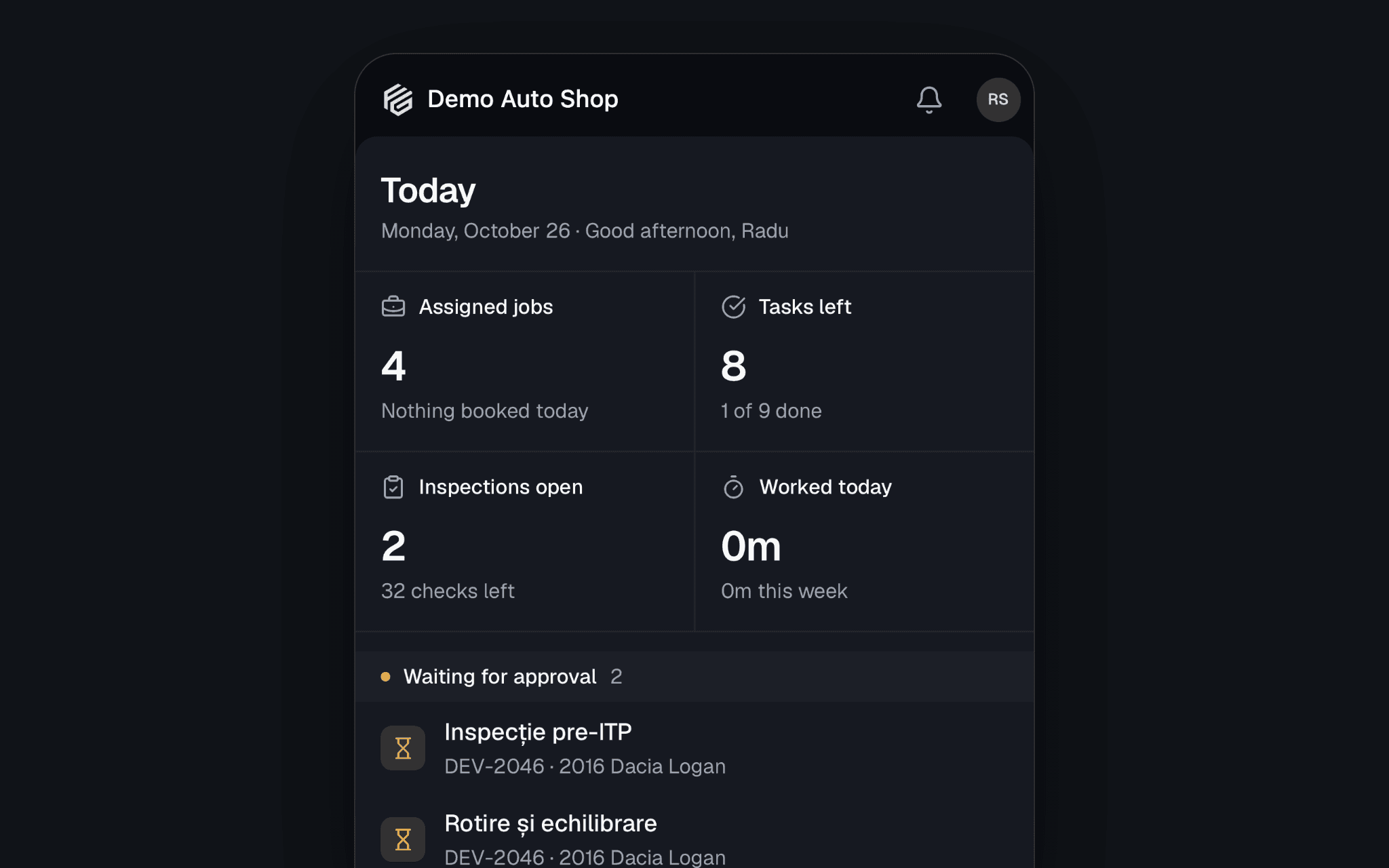
In November your technicians get an app of their own. GarageFlow Tech puts the work on the phone in their pocket: the jobs assigned to them, the clock, inspections with photos, and parts. It comes to iPhone and Android, it's included on every plan, and they sign in with the same email and password they use for GarageFlow on the web.
Today, at a glance
The Today tab opens on what's in front of them: their jobs, Booked today, what's Waiting for approval and the Inspections to finish. A job opens on the Customer concern, then the services and their lines, the advisor's notes, the photos and the activity.
A technician sees only the jobs assigned to them, and never a price.
The clock, from the job
Start on a line runs the timer against that job, and the bar reads what's worked against what's authorized, such as 0:42:07 / 1:30:00. Stopping asks how it went: Done, mark it complete, Not finished, I'll come back to it or Keep working. It's the same timer as Time Clocks on the web, so the hours are there the moment they're worked.
Inspections, photos and recommendations
- Start an inspection from one of your templates, then answer each check.
- Take a photo or Record a video, and Mark up photo with circles, arrows and labels.
- Recommend work sends what the car needs to the advisor, marked Now, Soon or Monitor, with the hours if the technician wants to estimate them. The advisor prices it.
Around the bay
- Scan a VIN to open the job for that car, or to fill in a VIN the car doesn't have yet.
- Parts: stock on hand and the bin, searched by part number, name or brand.
- Move to puts the job in another lane on the board as the car moves.
- Print an oil sticker straight from the job (more about oil stickers).
- My hours: flagged hours against hours on the clock, this week and last.
- Notifications when they're given a job, when the schedule changes, and when the parts for a job arrive.
- App lock asks for Face ID, a fingerprint or the phone's passcode when the app opens.
When the signal drops
Jobs stay on the phone, and photos and notes wait their turn to sync when the connection is back. The clock, starting an inspection and moving a job need a connection, because the shop records them, not the phone.
Get your shop ready now
- Give each technician their own login in Settings → Users & Roles → Invite Member. Anyone on your team can sign in to the app.
- Assign the work. On an order, use Assign technician on each service. The app lists approved and in-progress jobs, so an estimate shows up once the customer approves it.
- Build your inspection templates in Lists → Inspection Templates.
- Fill in each part's Bin Location, so the Parts search tells a technician where to look.
The app speaks all seven of GarageFlow's languages and follows each technician's own. We'll post again the day it's in the App Store and on Google Play.